
 iOS
iOS Android
 React Native
 Unity
Unity Flutter
 Ionic
Ionic IOT
IOT OTT
OTT Wearable
 Angular
 Python
 Vue.js
 Node.js
 PHP
PHP Laravel
 .Net
.Net WordPress
 Shopify
 Drupal
 Magento
 Social Media Marketing
 PPC Expert
 Content Writers
 GEO
GEO
 Virtual Assistants
 IT Support
 Customer Support
 Order Processing
 Contract Reviewers
 Logistics Coordinator
 eCommerce Solutions
 Bookkeeping
 Tax Preparation
 AR/AP Specialists
 Automation Testing
 Manual Testing
 AI Developer
 ML Developer
 RPA Developer
 UI/UX Designer
 Graphic Design
 Animation
 3D CAD
Voice-first interaction is not just an innovation in interface design. It is a complete redefinition of how users engage with mobile applications. Can you imagine investing in a highly functional mobile application, only to realize that your users are abandoning it, not because of performance issues, but because it just no longer aligns with how they expect to interact with the app. Your consumers are not looking for fancy icons or nested menus. They want quick access to their services by just voicing it to the application. Intelligent user interface design is a basic expectation of every smartphone user today.
Over 8.4 billion digital voice assistants are being used globally, out of which more than 71% of mobile users in the US prefer a voice user interface for fast, hands-free interactions. This shift itself has created a silent but urgent demand for voice user interface design to be an integral part of modern user interface design strategies.
But as a decision-maker, how would you know whether your current UX roadmap is equipped to even meet this shift?
That’s where voice-first design comes into focus. It shows up as the next critical frontier in user experience. This blog will present to you what voice-first interaction truly means, why it matters in mobile app development today, and what design principles will shape the future of intelligent user interfaces, specifically for leaders driving product and innovation at scale.
What is Voice User Interface Design in Mobile Apps?
A voice user interaction interface design isn’t just about adding voice commands to an already existing app. It’s about rethinking user interface design where voice is the primary mode of interaction, not a secondary convenience.
Let’s make this distinction clear:
- Voice-enabled apps allow users to use voice as an alternative, such as dictating text.
- Voice-first apps are designed from the ground up for voice as the main control, where the screens are complementary.
A mobile application with an online voice user interface design allows the users to speak while the system listens, understands, responds, and executes the said tasks without relying on taps or swipes.
This changes the role of the interface. In voice user interface design, there are no visual cues or buttons to guide the user. The interaction is simply conversational, driven by intent, and powered by natural language processing.
It’s not a redesign; rather, it’s a rearchitecture of the entire user interface design, from flow logic to information hierarchy, based on how people speak, not how they touch.
Why Voice User Interface Design Is Now Critical in Mobile App Development
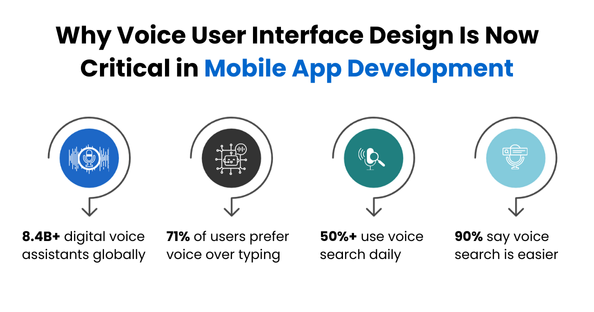
No matter what age group you belong to, the evolution of smart devices cannot go unnoticed. Voice interactions have become mainstream, and they’re only growing. Even ChatGPT rolled out its voice intelligent user interface on September 25, 2023, and with ongoing improvements, it’s now even available to all. This feature allows users to talk to the AI model and have an entire back-and-forth conversation with it.
The adoption curve isn’t subtle at all.
Data shows that-
- 90% of people find voice search easier than typing, 89% find it more convenient, and 87% believe it is faster.
- 77% of people aged 18–34 use voice search on smartphones
- 71% of consumers prefer conducting quick tasks by voice instead of typing
- Voice search is used by more than 50% of mobile users daily, especially in high-speed, hands-busy scenarios like driving or cooking.
These insights matter because they show that user expectations have grown with the uproar of mobile app development trends. The apps are no longer being designed for users who are sitting still, with complete attention, and two free hands.
Modern mobile app users are:
- Multitasking
- On the move
- Seeking instant answers and actions
Voice user interface design in mobile apps solves these problems. They reduce friction, increase speed, and improve accessibility, all while making them more practical.
You can also consider Uber’s voice booking feature. Instead of navigating the app visually, users can say “Get me a ride to the airport,” and it happens.
What these examples show is simple: voice user interface design is becoming the baseline for fast, intelligent, and intuitive mobile interaction.

Designing for the Next UX Paradigm
As of 2025, a lot of mobile interfaces still follow a touch-first design philosophy. It is reflected in both design guidelines and user behavior. Touch remains the primary input method and fairly so, because mobile app interfaces are overwhelmingly designed with touch in mind, such as through large, finger-friendly buttons, gestures (swipe, pinch, tap), and the continued emphasis on touch-friendly layouts in modern UI/UX guides.
But it needs to change.
This is not just a UI enhancement. It’s a paradigm shift.
Why?
Because the use of ‘voice’ changes the nature of how users think, act, and expect the outcomes. The users will find it much easier to interact with the voice user interfaces, as they have quick navigation and output.
It does not have a step-by-step flow. The app has to understand intent, provide feedback through sound, and adapt in real time, like a conversation.
Think for yourself: why wouldn’t someone use something that is so much easier and will require far less effort?
This shift to an intelligent user interface brings major benefits to the consumer:
- Speed: Voice completes actions faster than touch or typing
- Accessibility: Opens digital experiences to users with visual, motor, or literacy challenges
- Contextual Intelligence: Voice apps can leverage location, history, and timing to anticipate needs
- Multitasking Support: Enables interactions while users drive, cook, or walk
In essence, voice-first mobile UX is about interface intelligence. For product and technology leaders, this is more than a UX upgrade; it’s a strategic realignment. Collaborating with a mobile app development company, will help you gain deeper insights into how you can enhance your voice user interface design. The question asked is no longer whether to invest in voice; it’s whether your application can remain relevant without it.
Core Design Principles for Voice User Interface Design in Mobile Apps
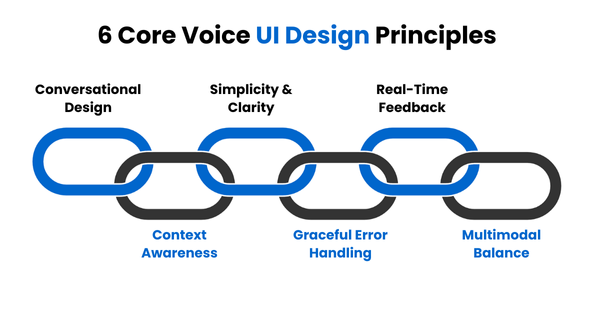
When you design a voice user interface, you do not just port a graphical user interface (GUI) to voice. This kind of design requires a complete departure from traditional user design patterns and reimagination of how the interaction happens.
There are no screens to guide, no icons to prompt, no swipes to fall back on. In a voice-first mobile environment, the user interface is invisible, but it should be intuitive, intelligent, and responsive.
Here are six core principles to guide your voice user interface design strategy:
1. Design for Conversations, Not Commands
Ditch the robotic prompts and aim for natural, back-and-forth interaction, like talking to a helpful assistant. Use language that mirrors human speech: casual, clear, and task-focused.
2. Prioritize Simplicity and Clarity
The user can’t “see” their options, so try not to overwhelm them. Prompts and responses must be short, direct, and easy to interpret. Avoid multi-step logic that overloads memory or attention.
3. Provide Real-Time Feedback
Users need confirmation that the app is listening, processing, or doing something. Use auditory cues, tones, brief messages, or haptic signals to indicate status and errors. Focus on micro interactions.
4. Be Context-Aware and Adaptive
Effective voice-first design uses context, location, time, and user history to streamline interaction. Intelligent defaults and intent prediction improve accuracy and user trust.
5. Handle Errors Gracefully
Voice recognition will fail sometimes. Plan accordingly. Give helpful fallback prompts, don’t make users repeat themselves, and guide them toward alternatives. The failure state must still feel intelligent.
6. Balance Voice with Multimodal UX
Sometimes, voice alone won’t cut it. So, blend voice with visuals (like showing options after a query), especially for tasks that involve choices, scanning, or confirmation.
Understand that voice-first interactions are not about removing the visuals. It’s about making sure that you know what’s to be prioritized and what’s best for the moment. Intelligent user interfaces allow users to flow seamlessly between speech, touch, and visual guidance without causing any friction. Make sure to assess all the post-launch KPI’s to keep your data insights relevant and for further predictive growth. This will help you avoid any friction that might come your way.
Real-World Case Studies
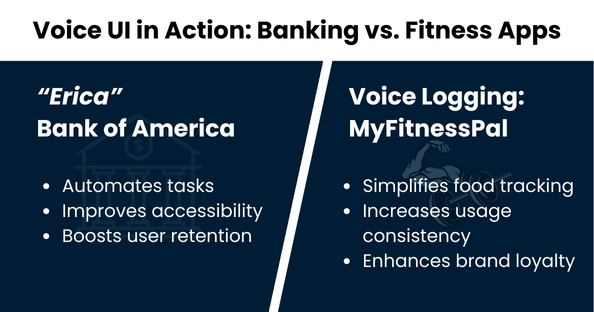
If you still think that voice user interface designs are limited to experimental applications, then you are wrong. It’s now embedded into the mainstream mobile products with measurable business outcomes.
Have a look at these two cases, which will help you understand how leading brands are using voice online user interface in mobile applications for their growth:
Case Study 1: Bank of America- Voice Assistant “Erica”
Bank of America’s mobile app includes Erica, a voice-powered virtual assistant that helps users check balances, pay bills, locate transactions, and even receive personalized financial insights. All these facilities are just through natural speech.
Strategic impact of this voice user interface design:
- Automates routine banking tasks, reducing reliance on customer support
- Enhances app usability for less tech-savvy or visually impaired users
- Improves user retention by offering fast, context-aware assistance
Erica’s success across the continent demonstrates that voice user interfaces are shaping customer expectations in such regulated, high-trust industries.
Case Study 2: MyFitnessPal – Voice-Enabled Nutrition Logging
MyFitnessPal allows users to log meals and workouts using voice commands integrated with smart assistants. Instead of navigating the app manually, the users can directly say, “Log lunch: grilled chicken salad,” and the entry will be saved automatically.
Strategic impact of such brilliant, intelligent user interfaces:
- Removes friction from high-frequency tasks such as food tracking.
- Increases consistency of usage, especially for mobile users on the go.
- Strengthens brand loyalty through a more convenient, user-friendly interface.
MyFitnessPal has turned a tedious user action into a seamless voice-driven experience by leveraging intelligent user interfaces, without overhauling the app’s visual interface.
> Read: How To Create a Fitness App: A Step-by-Step Guide to Fitness App Development in 2025
Why Leaders Must Act Now!
Voice-first mobile UX is not experimental anymore; it’s strategic.
Leaders must recognize that user interface design is evolving from buttons and icons to intent and conversation. The market is already moving fast, with competitors rolling out voice user interfaces that are faster, smarter, and more inclusive.
If your mobile app doesn’t listen, then be sure that it won’t be heard.
Voice user interface design is about designing mobile experiences that work in real life, in real time, and for real users.
This is a baseline requirement for digital-first businesses.