 iOS
iOS Android
 React Native
 Unity
Unity Flutter
 Ionic
Ionic IOT
IOT OTT
OTT Wearable
 Angular
 Python
 Vue.js
 Node.js
 PHP
PHP Laravel
 .Net
.Net WordPress
 Shopify
 Drupal
 Magento
 Social Media Marketing
 PPC Expert
 Content Writers
 GEO
GEO
 Virtual Assistants
 IT Support
 Customer Support
 Order Processing
 Contract Reviewers
 Logistics Coordinator
 eCommerce Solutions
 Bookkeeping
 Tax Preparation
 AR/AP Specialists
 Automation Testing
 Manual Testing
 AI Developer
 ML Developer
 RPA Developer
 UI/UX Designer
 Graphic Design
 Animation
 3D CAD
The education industry is going through a massive shift – and it’s happening fast.
Ever since COVID-19 disrupted traditional classrooms, people have realized that learning doesn’t have to be confined to four walls and a chalkboard. In fact, many now prefer digital learning experiences that are flexible, interactive, and available anytime, anywhere – and that’s exactly what educational apps are delivering.
From language learning and exam prep to employee training and upskilling platforms, educational apps are becoming an integral part of every industry. It’s no surprise that the EdTech market is expected to cross $400 billion by 2030.
But if you’re planning to explore educational app development, there’s one question that definitely comes across mind – “How much does it cost to make an educational app?”
The truth is, there’s no one concrete answer. The cost of developing an education app depends on what you’re building, the features you need, who’s building it, and how fast you want to go to market. That’s exactly what we’ll break down in this blog.
Post reading this blog, you’ll get a clear picture of the different types of educational apps, the key features that impact education app development cost, the development stages involved, and even some smart ways to optimize your budget without compromising on quality. You can also download our free eBook – “The Real Cost of Building an Educational App” for a comprehensive overview of the costs involved in building one yourself!
Let’s get started!
Types of Educational Apps and How They Impact Costs
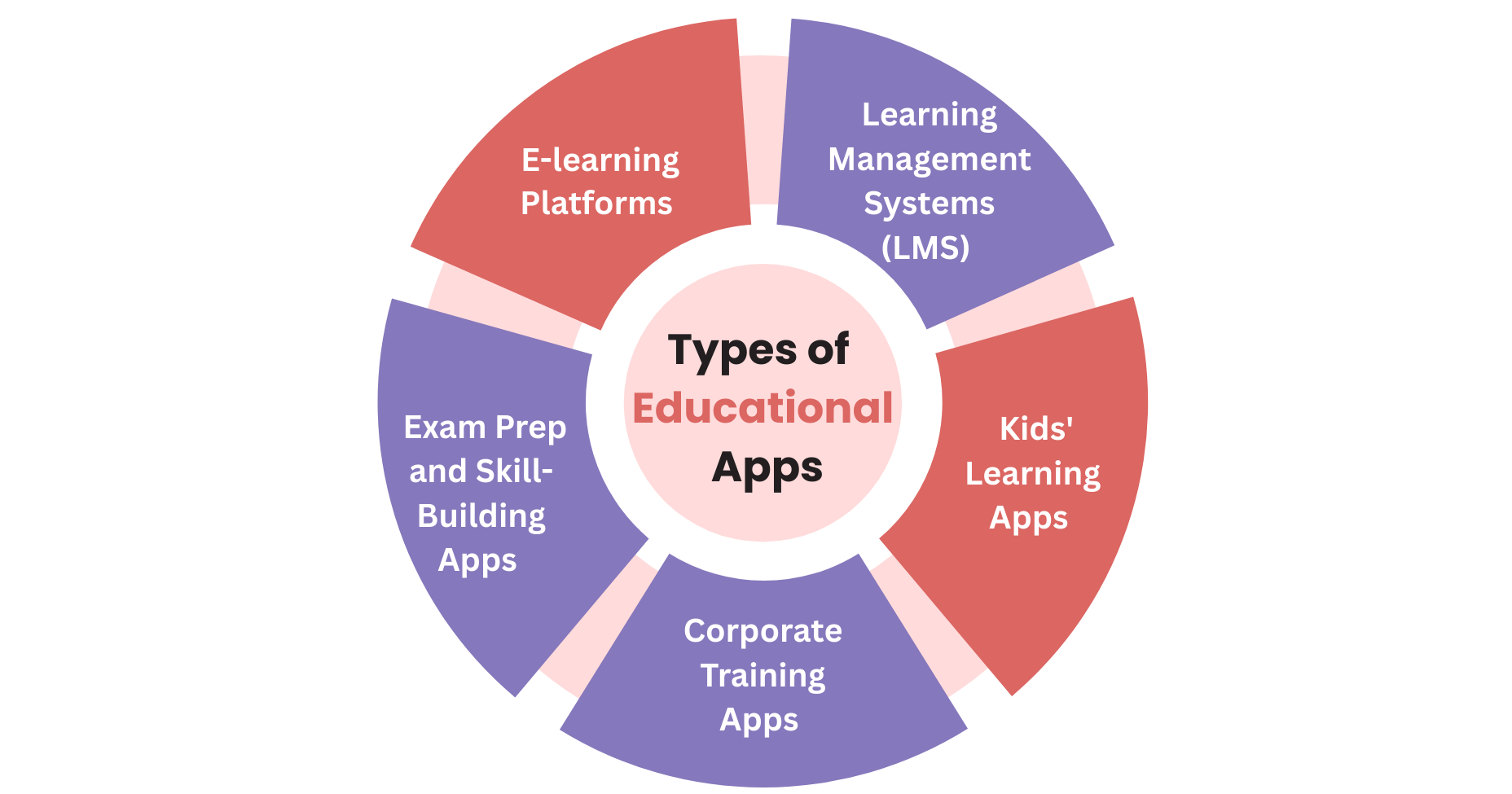
When it comes to educational app development, not all apps are created equal. The type of app you’re building plays a major role in determining your overall educational app development cost. Why? Because different use cases require different features, levels of complexity, integrations, and scalability.
Let’s break down some of the most common types of educational apps and how each affects your development cost.
1. eLearning Platforms
These apps deliver structured online courses, often with video content, assessments, progress tracking, and certification.
Examples: Coursera, Udemy, Skillshare
Key Cost Drivers:
- Video hosting and streaming
- Course builder tools for instructors
- User analytics and progress tracking
- Payment gateway integrations
These platforms tend to be feature-heavy, so you must expect higher education app development cost, especially if you plan to scale quickly.
2. Learning Management Systems (LMS)
Overview: LMS apps are often used by schools, universities, or corporations to manage and deliver training programs internally.
Examples: Moodle, Blackboard, TalentLMS
Key Cost Drivers:
- Role-based access (admin, educator, student)
- Assignment submissions and grading
- Integration with HR or ERP systems
- Compliance and reporting features
These apps are robust, built for scalability and long-term use, which naturally pushes up the education app development cost.
3. Kids’ Learning Apps
Overview: These focus on interactive, gamified learning experiences designed to engage younger learners through visuals, sound, and storytelling.
Examples: ABCmouse, Duolingo Kids
Key Cost Drivers:
- Gamification elements (badges, points, progress rewards)
- Bright, animated interfaces
- Voice recognition or text-to-speech
- Age-appropriate security measures
While these apps may seem simple, the design and UX complexity, especially if you’re targeting multiple age groups, can raise the educational app development cost.
4. Corporate Training Apps
These apps help companies upskill employees, track training performance, and deliver onboarding content remotely.
Examples: EdApp, WorkRamp, Docebo
Key Cost Drivers:
- Integration with internal systems
- Custom branding and dashboards
- Real-time performance analytics
- Offline access and mobile responsiveness
Corporate training apps typically require strong data analytics and enterprise-level security, which adds to the complexity and cost of developing education app.
5. Exam Prep & Skill-Building Apps
These apps provide practice tests, quizzes, flashcards, and revision materials focused on a specific test or subject area.
Examples: Quizlet, Gradeup, Magoosh
Key Cost Drivers:
- Large question databases
- Timed tests and scoring logic
- Adaptive learning paths
- Offline functionality
These apps are usually less complex than full LMS platforms but still require solid backend logic and UI for a smooth user experience. A reputed education app development company can help you build a cost-effective exam-prep app seamlessly.
Our Tip:
The more specialized the app, the more complex (and expensive) the development becomes. For example, a simple flashcard app will be far more affordable than a multi-role LMS with real-time video conferencing and AI-driven personalization.
In the next section, we’ll break down the specific features that can dramatically influence your educational app development cost, regardless of the type you choose.
Key Features That Influence Educational App Development Cost
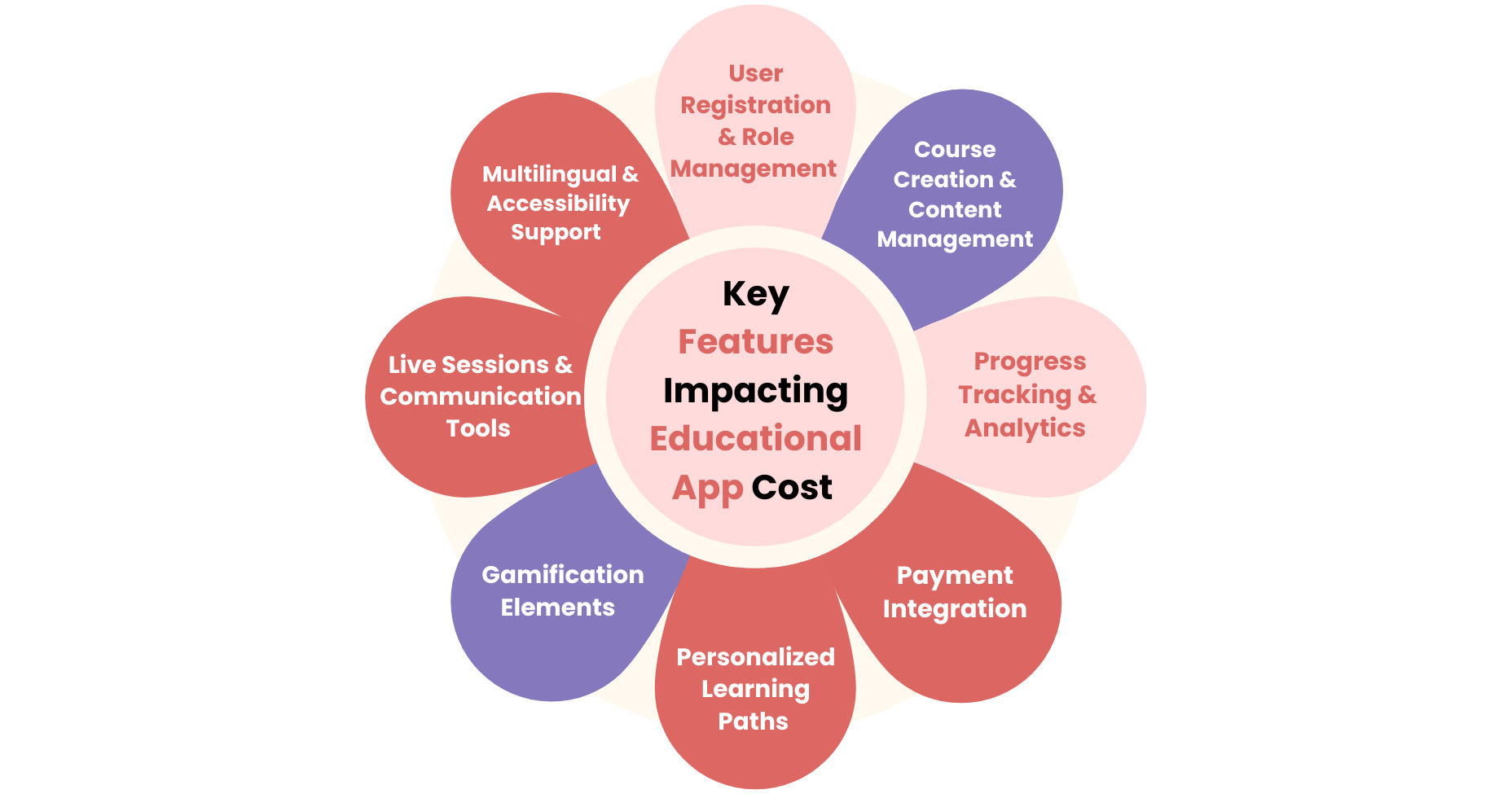
Whether you’re building a language-learning app or a corporate training platform, the features you choose will have a direct impact on your education app development cost. Some features are foundational, while others are optional but can greatly enhance user engagement and value, if your budget allows.
Let’s take a closer look at which features are essential, which are nice-to-have, and how each contributes to your overall cost of developing an educational app.
1. User Registration & Role Management
Every educational app needs a secure, seamless login system. You may also need to accommodate multiple user roles, like students, instructors, and administrators.
Key considerations:
- Social login (Google, Facebook, Apple)
- Single Sign-On (SSO) for enterprise users
- Role-based access control
The complexity increases if you’re integrating enterprise-grade security or custom authentication systems, thus, increasing the education app development cost.
2. Course Creation & Content Management
This is the core of most educational apps. Instructors or admins need the ability to upload content, create modules, and organize learning paths.
Key considerations:
- Text, video, audio, and quiz uploads
- Drag-and-drop course builder
- Version control for content updates
Building an intuitive course builder and scalable content management system can take a significant chunk of your budget, thus increasing the overall cost of developing education app.
3. Progress Tracking & Analytics
Learners want to see their growth, and educators need to track performance. Analytics are also key for organizational decision-making, hence progress tracking and analytics are critical features that you must include in your educational app.
Key considerations:
- Learner dashboards
- Completion rates, scores, and usage data
- Admin-level reports
Advanced analytics that integrate with BI tools will drive higher education app development cost.
4. Payment Integration
If you’re monetizing your app through subscriptions, pay-per-course, or freemium models, you’ll need a secure and user-friendly payment system.
Key considerations:
- One-time and recurring payments
- In-app purchases
Don’t forget the ongoing fees and compliance requirements like PCI DSS, which significantly contribute to the educational app development cost.
5. Personalized Learning Paths
Personalized experiences improve retention and engagement by adapting content based on learner behavior or preferences.
Key considerations:
- AI/ML recommendation engine
- Adaptive assessments
- User behavior tracking
AI-driven features require skilled developers and data infrastructure, but they can significantly increase your app’s value. Thus, incorporating personalized learning paths with the help of AI have now become essential while developing an educational app.
6. Gamification Elements
Gamification boosts motivation and keeps users engaged through challenges, rewards, and feedback loops.
Key considerations:
- Points, badges, levels
- Leaderboards
- Progress milestones
These features are not essential, but they’re often worth the investment while considering educational app development services, especially in apps targeting younger audiences.
7. Live Sessions & Communication Tools
Real-time interaction is essential for many use cases, including tutoring, live lectures, or coaching, thus making them important to incorporate while developing an educational app.
Key considerations:
- Live video integration (Zoom, WebRTC)
- In-app chat and discussion forums
- Notifications and announcements
Live video and chat features can dramatically increase infrastructure and education app development costs.
8. Multilingual & Accessibility Support
If you’re targeting global users or aiming for inclusivity, multilingual and accessibility support features are critical.
Key considerations:
- Multiple language support
- Screen readers and text-to-speech
- WCAG compliance
While often overlooked, these are essential to incorporate while developing an educational app for global scalability and user satisfaction.
Feature Planning Tip:
Not every feature needs to go live on Day 1. Start with a Minimum Viable Product (MVP) that includes core functionalities. Build advanced features over time, based on user feedback and budget availability. You must also consider which features can increase mobile app engagement and user retention, and plug them first into your app.
In the next section, we’ll break down the actual cost of developing education app, stage by stage, so you can better plan your budget and timelines.
Development Stages Impacting Costs
When developing an educational app, it’s crucial to understand where your money goes, not just how much you’ll spend overall. Breaking the process down by development stage helps you set expectations, allocate budget wisely, and minimize the risk of scope creep.
Below is a stage-by-stage breakdown of what typically goes into building an educational app – and what each phase might cost.
1. Discovery & Planning
What it includes:
- Market research and competitor analysis
- Defining user personas and learning goals
- Technical feasibility assessment
- Wireframing and roadmap planning
Why it matters: This sets the foundation for everything else. It’s where you align your app’s goals with user needs and technical requirements.
2. UI/UX Design
What it includes:
- User journey mapping
- High-fidelity mockups and clickable prototypes
- Design system and style guide
- Responsive layouts for mobile, tablet, and desktop
Why it matters: Great design isn’t just about aesthetics – it drives engagement, usability, and retention.
3. Frontend & Backend Development
What it includes:
- Frontend: Screens, interactions, navigation
- Backend: Server logic, APIs, database architecture
- Admin panel and role-based access controls
- API integration with payment gateways, video platforms, LMS tools
Why it matters: This is the core engine of your app. The complexity of your features will heavily influence the education app development cost here.
(Lower end for basic apps, higher for scalable or enterprise-level platforms)
4. Quality Assurance (QA) & Testing
What it includes:
- Manual and automated testing
- Functional, regression, and integration testing
- Performance and security testing
- Device/browser compatibility checks
Why it matters: Skimping on QA leads to user frustration, poor reviews, and a higher cost of developing education app later. Investing in QA and testing from the start saves money in the long run.
5. Deployment & Launch
What it includes:
- App store submissions (Apple App Store, Google Play)
- Backend server deployment (AWS, Azure, etc.)
- Final security audits and performance tuning
- Monitoring setup and release support
Why it matters: A smooth launch ensures faster adoption and fewer post-launch headaches.
6. Ongoing Maintenance & Updates
What it includes:
- Bug fixes and app updates
- Feature enhancements based on user feedback
- Server monitoring and database optimization
- Support for OS and library updates
Why it matters: Development doesn’t stop at launch. Budgeting for continuous improvement is essential for the long-term success of your education app. An end-to-end education app development company will definitely provide you with ongoing maintenance and support.
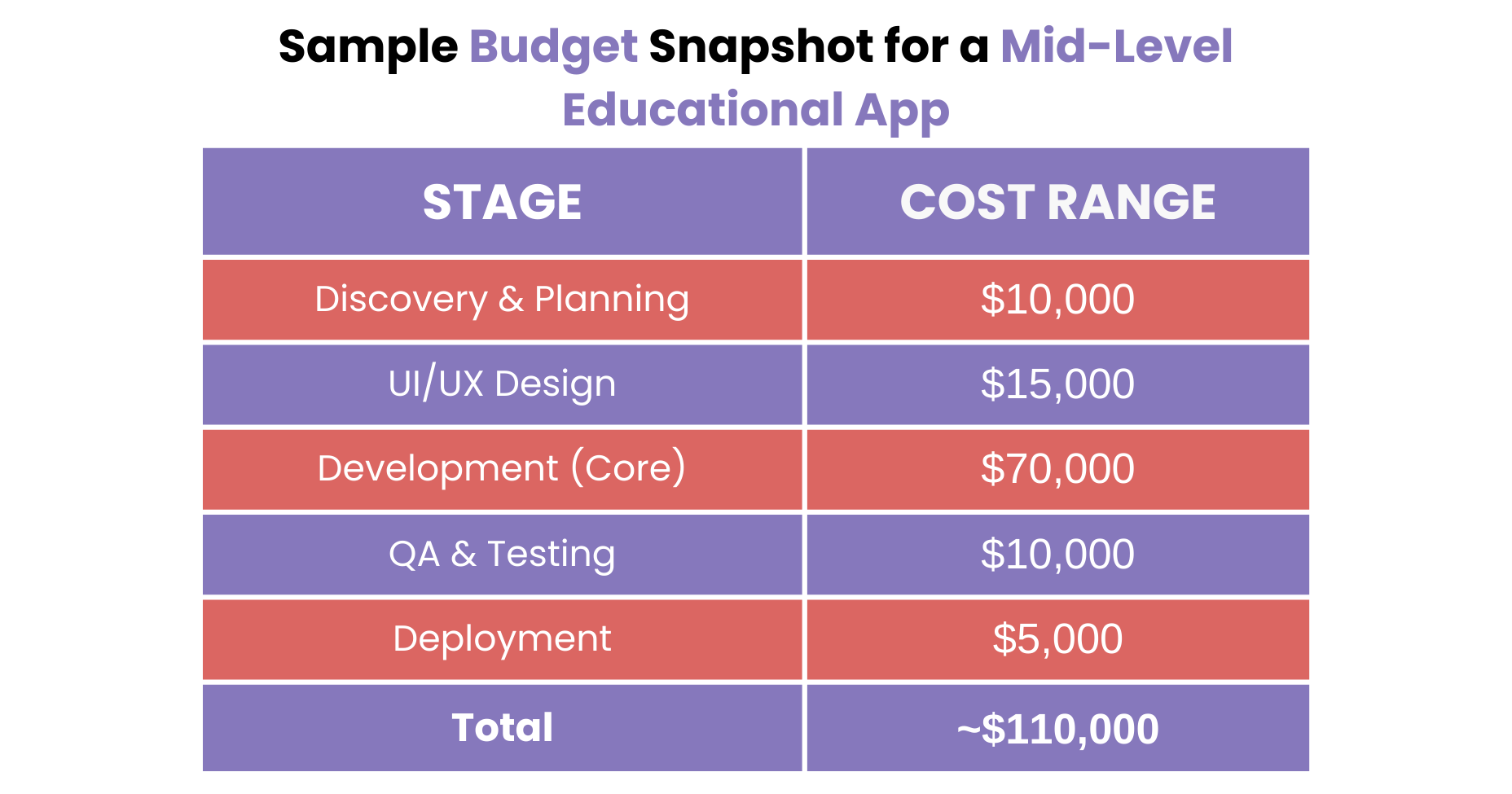
Important: Education app development cost can vary significantly depending on your tech stack, vendor location (onshore vs offshore), and the complexity of your app’s features.
In the next section, we’ll explore some hidden costs that often go unnoticed – but can add up quickly to the cost of developing education app if you’re not prepared.
Hidden Educational App Development Costs to Watch For
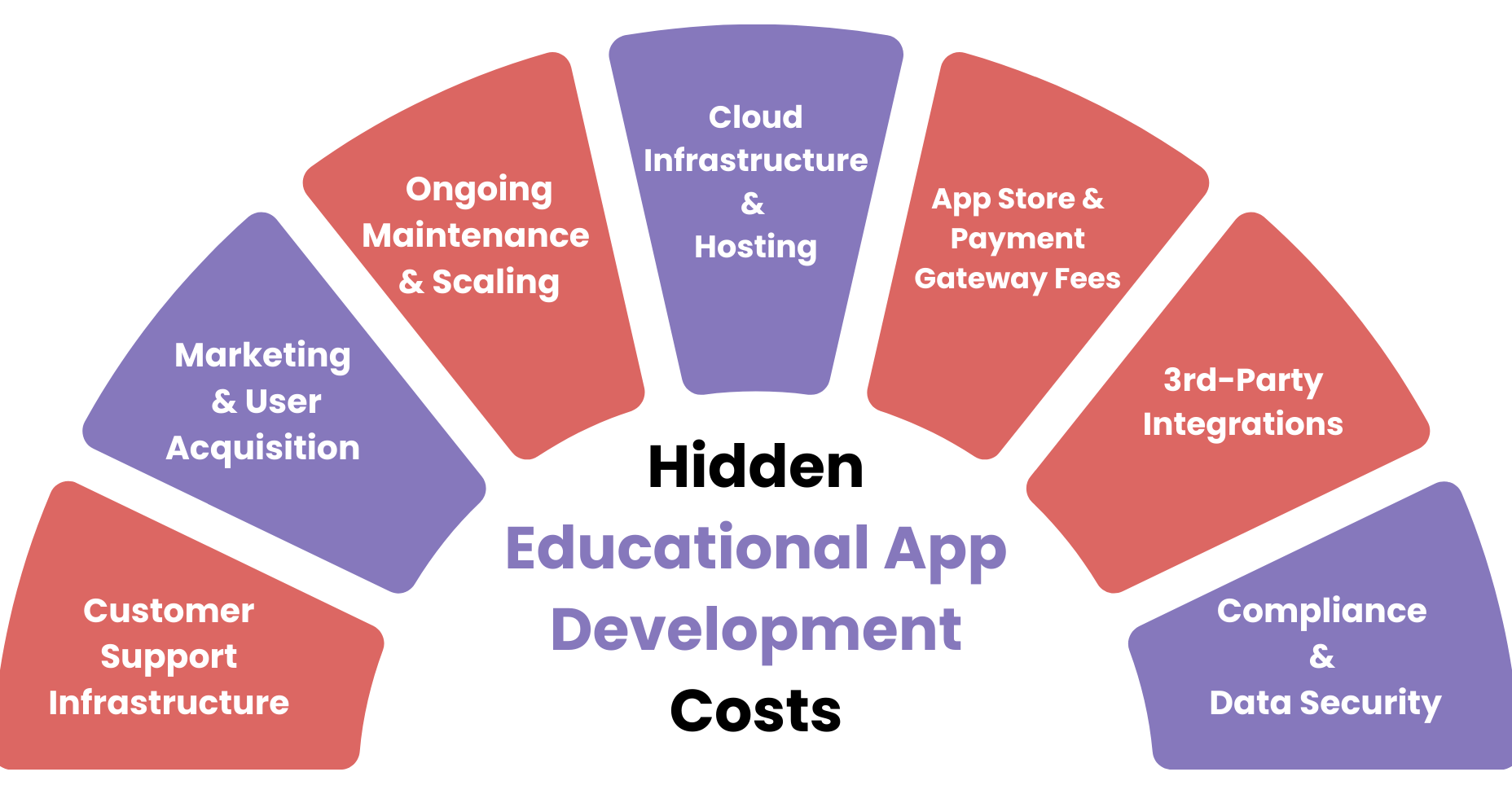
While most app budgets account for design, development, and testing, there are several less obvious expenses that can sneak up on you and significantly inflate your total investment if left unaccounted for. This hidden educational app development cost often doesn’t show up until late in the process or even post-launch, but they’re just as important to plan for upfront.
Let’s break down the most common ones:
1. Cloud Infrastructure & Hosting
What’s often overlooked: Educational apps require reliable cloud hosting, especially if you’re storing large amounts of content or handling real-time video.
Common platforms: AWS, Google Cloud, Microsoft Azure
Cost Impact: $300 – $2,000+ per month (based on traffic and content volume)
Scalability and uptime are non-negotiable for learning platforms, so this is a recurring cost worth budgeting for.
2. App Store & Payment Gateway Fees
What’s often overlooked: Both Apple App Store and Google Play charge a 15–30% commission on in-app purchases or subscriptions. Payment processors like Stripe and PayPal also charge 2.9% + $0.30 per transaction.
Cost Impact:
- App store fees: 15–30% of revenue
- Payment processors: ~3% of each transaction
These fees may seem small, but they can add up quickly, especially if you’re generating high transaction volume.
3. 3rd-Party Integrations
What’s often overlooked: Many educational apps rely on third-party tools to offer advanced features, like video conferencing, email automation, analytics, or AI.
Examples:
- Zoom or Twilio for live video
- Chatbots or AI tutors
- CRM or LMS integrations
Cost Impact: $50 – $500+/month, depending on the tool and usage
Some libraries or SDKs also have licensing fees or user-based pricing tiers.
4. Compliance & Data Security
What’s often overlooked: If your app collects user data, especially from minors or users in regulated industries, you’ll need to comply with laws like FERPA, COPPA, GDPR, or CCPA.
Cost Impact:
- Legal consultations: $2,000 – $10,000+
- Compliance tech implementation: $3,000 – $8,000
Failing to comply can lead to legal issues, user mistrust, or removal from app stores.
5. Customer Support Infrastructure
What’s often overlooked: A smooth support system isn’t just a value-add; it’s a necessity. Whether it’s live chat, help center articles, or ticketing systems, support tools come with recurring costs.
Cost Impact: $500 – $2,000/month, depending on user base and support volume
6. Marketing & User Acquisition
What’s often overlooked: Launching the app is just the beginning—you also need to attract and retain users. Many teams underbudget for this phase.
Cost Impact:
- App Store Optimization (ASO): $2,000 – $5,000+
- Paid campaigns: $1,000/month and up
- Content marketing, SEO, and email campaigns
7. Ongoing Maintenance & Scaling
What’s often overlooked: As your user base grows, so do the demands on your infrastructure, support systems, and engineering team.
Cost Impact: $1,000 – $5,000+/month (beyond initial maintenance)
Scalability planning should be part of your roadmap from Day 1—otherwise, growth becomes expensive fast.
Hidden costs aren’t necessarily bad; they’re just unplanned. The more proactive you are about identifying these expenses early, the more accurate your budget will be, and the fewer surprises you’ll face down the road.

Tips to Optimize Educational App Development Cost
Building an educational app doesn’t have to mean blowing through your budget. With the right approach, you can maximize value while minimizing unnecessary expenses, without compromising on quality, user experience, or long-term scalability.
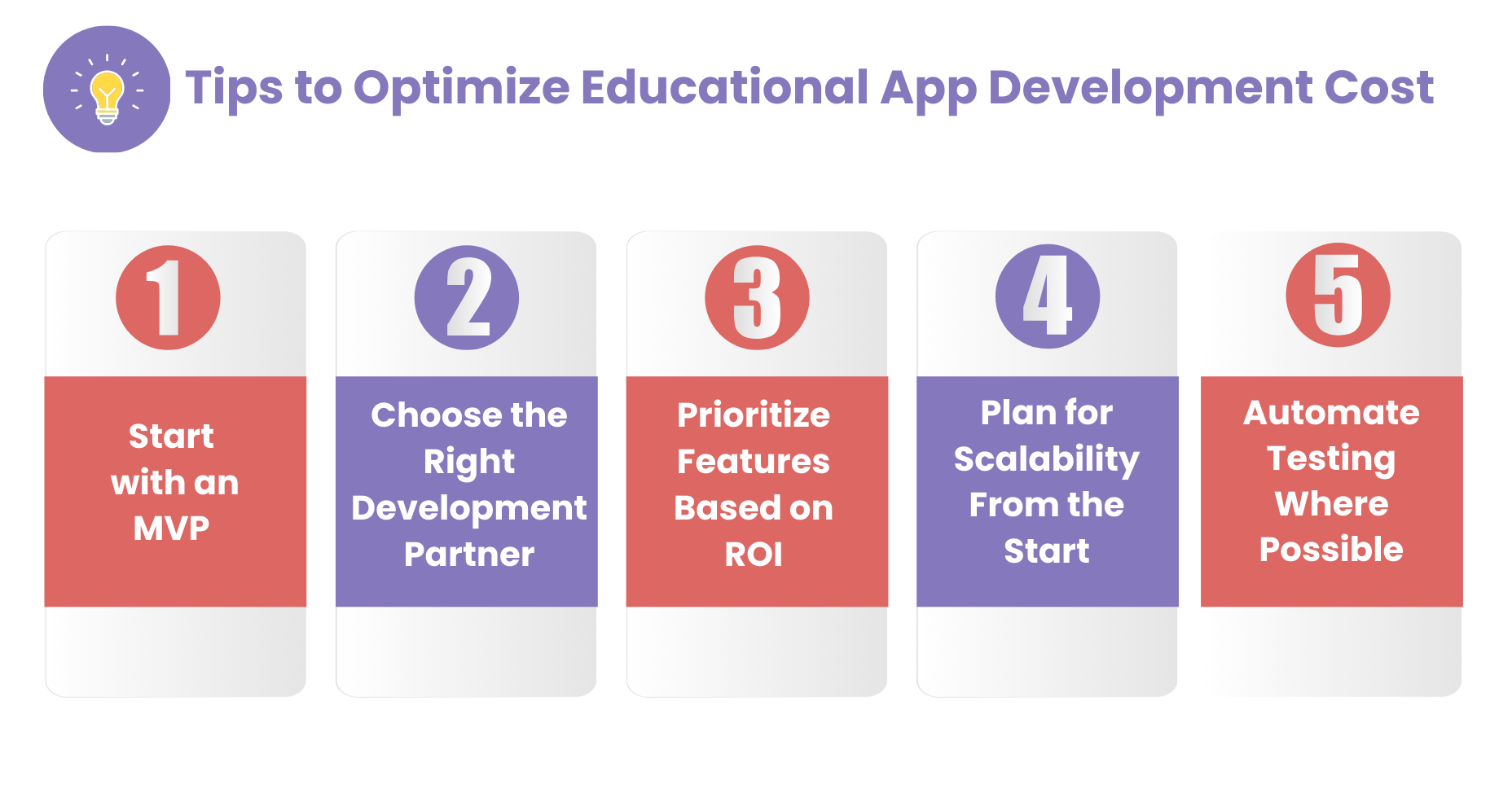
Here are some proven, ROI-driven strategies to help you optimize your educational app development cost:
1. Start with an MVP (Minimum Viable Product)
Don’t try to build the perfect product on Day 1. Instead, launch with a streamlined version of your app that includes only the core, must-have features. This allows you to:
- Validate product-market fit early
- Gather real user feedback
- Reduce upfront investment
- Prioritize enhancements based on actual usage
2. Choose the Right Development Partner
The education app development company you work with can significantly impact your overall development cost. There are several factors you need to consider while choosing the right development partner for your business.
What to look for:
- Proven experience in EdTech development
- Ability to offer offshore or hybrid development models
- Transparent pricing and agile delivery
A well-vetted offshore or hybrid team can deliver the same quality as a U.S.-based agency at comparatively lower costs.
3. Prioritize Features Based on ROI
Not all features offer equal value. Some are critical for user retention, while others are nice to have but don’t move the needle.
Ask yourself:
- Will this feature increase user engagement?
- Will it help reduce churn or boost revenue?
- Can it wait until after launch?
Use a MoSCoW matrix (Must-have, Should-have, Could-have, Wont-have) to keep your roadmap lean and focused.
5. Plan for Scalability From the Start
It might be tempting to cut costs by skipping infrastructure planning, but fixing scalability issues later can be far more expensive.
What to do:
- Choose cloud providers with flexible pricing (e.g., AWS, Azure)
- Set up auto-scaling and caching early
- Use modular architecture so you can add new features without rebuilding the app
6. Automate Testing Where Possible
Manual QA can become expensive and time-consuming as your app grows. Incorporating automated testing early in the process reduces bugs, lowers long-term costs, and shortens deployment cycles.
Best for:
- Repeated regression tests
- User flows and functional testing
- Performance and load testing
7. Monitor & Iterate After Launch
Your launch isn’t the finish line, it’s the starting point for optimization of your education app. You must consider the following practices to optimize your educational app development cost post-launch.
- Use tools like Mixpanel or Google Analytics to monitor user behavior
- Identify underused features and remove or rework them
- Use A/B testing to optimize UX and engagement
Time = Money: Time to Market Estimates for Your Educational App
In app development, time is more than just a calendar metric, it’s rather a cost multiplier. The longer your project takes, the more resources you’ll consume, and the longer you’ll delay revenue generation or user adoption. That’s why it’s critical to have a realistic timeline in place from the start.
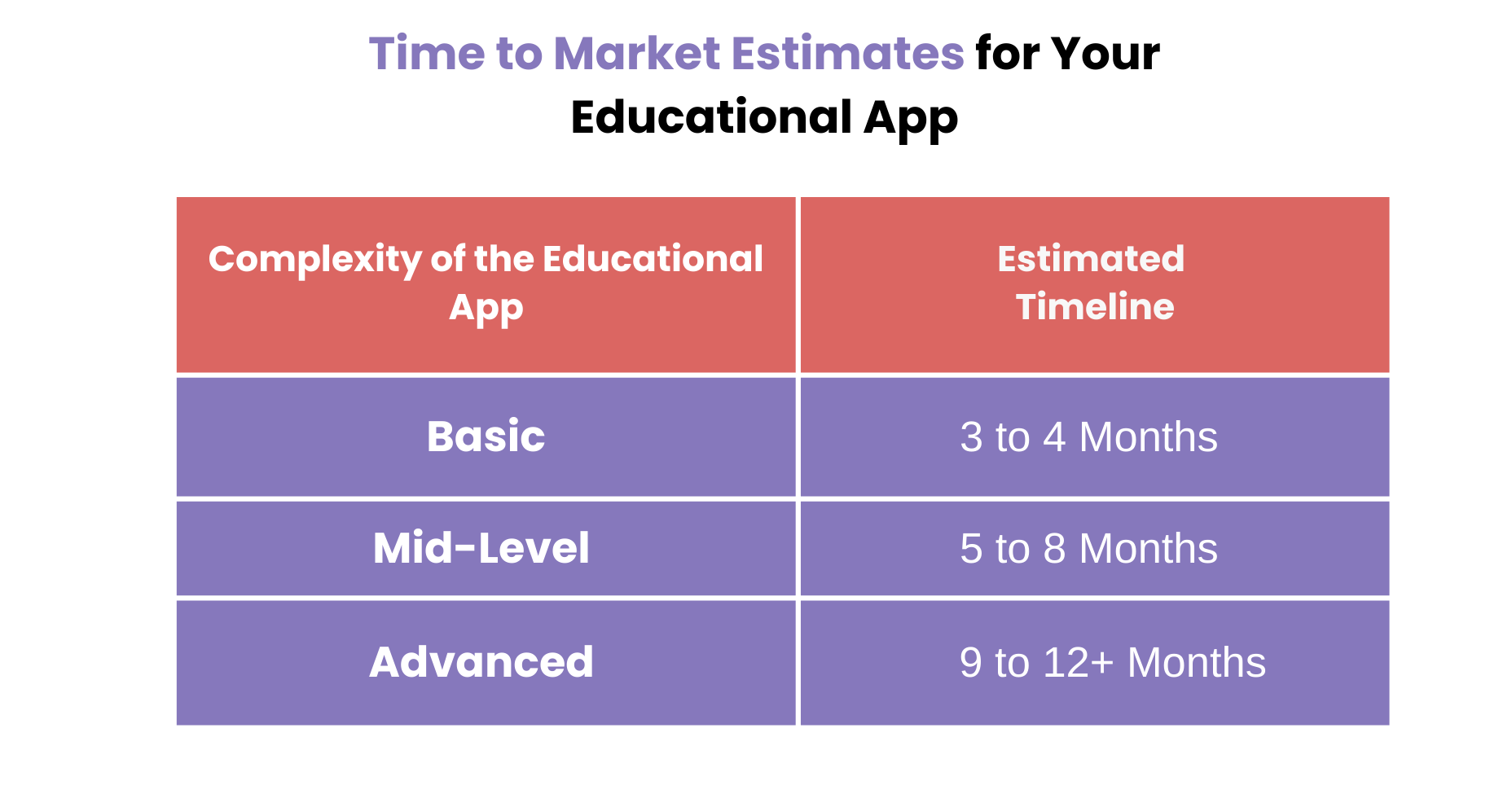
While no two apps are identical, we can outline general time-to-market estimates based on the complexity of the educational app you’re building.
1. Basic Educational Apps (MVP)
Use case: Flashcards, quizzes, simple content delivery
Includes:
- User registration
- Basic course or content modules
- Quiz or test feature
- Basic progress tracking
Estimated Timeline: 3 to 4 months
Ideal for launching quickly, validating your idea, and gathering early feedback.
2. Mid-Level Apps
Use case: K-12 learning platforms, skill development tools, corporate training apps
Includes:
- Course builder
- Role-based dashboards
- Analytics
- Payment integration
- Some level of gamification or interactivity
Estimated Timeline: 5 to 8 months
These projects often involve custom design, scalable backend systems, and more complex user flows.
3. Advanced Educational Platforms
Use case: Full-scale LMS, AI-driven learning platforms, apps with AR/VR modules
Includes:
- Real-time video or live sessions
- Personalized learning paths
- Deep analytics and reporting
- Multilingual support
- Compliance and accessibility features
Estimated Timeline: 9 to 12+ months
These platforms are more enterprise-grade and often require multiple development cycles, integrations, and stakeholder approvals.
Conclusion
Building an educational app in 2025 is a strategic investment, and therefore, this education app development cost guide answers a major question before you start with your app development journey – “how much does it cost to make an educational app?”
Whether you’re creating a corporate training platform, launching a new EdTech product, or digitizing classroom learning, the cost of developing educational app will depend on a variety of factors: the type of app, feature complexity, technology stack, development partner, and how efficiently you manage the process.
Here’s the bottom line:
A simple MVP might cost around $40,000–$60,000.
A full-featured, scalable platform could go well above $150,000–$250,000.
Ongoing costs for infrastructure, support, and marketing are just as important to plan for as development.
But education app development cost alone doesn’t determine value. What really matters is ROI – how well your app engages users, meets learning goals, scales with demand, and creates long-term business impact. That’s why smart planning, intentional feature prioritization, and choosing the right development partner are absolutely critical for you to consider while developing an educational app.
If you’re ready to explore educational app development – but want to make sure every dollar counts – you can download our free eBook to decode educational app development costs or also contact our experts to help you navigate the process with clarity and confidence.
Stay Tuned for More!